 Mock Location
Can location spoofing be hidden from apps
“How do I make spoofing undetectable” is asked more often than anything else. The short answer: hiding the first and most obvious sign is technically possible, but it does not give the result it is meant for — an app learns about spoofing in three more independent ways, and the cost of modifying the system is out of all proportion. Below is how detection actually works and why we neither describe nor support this path.
How an app learns about spoofing
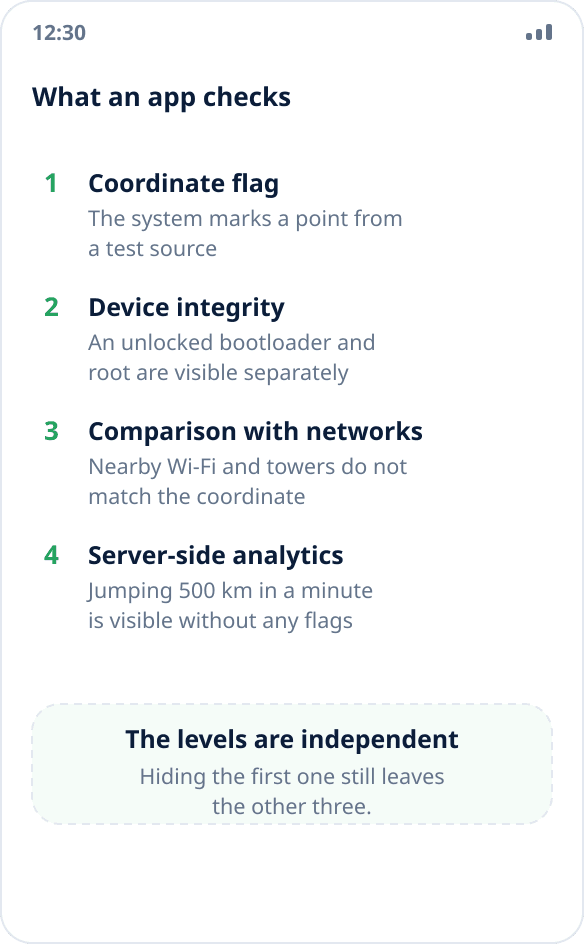
There are four levels, and they are independent of each other.
The first is a flag on the coordinate itself. Android marks every point from a test source with a separate field, and the app reads it with one line of code. This is an open, built-in system interface, not a secret check.
The second is device integrity. An unlocked bootloader and root are visible to platform attestation regardless of what happens to coordinates. The app does not need to know whether you are spoofing your location: it is enough to know that the system has been modified and refuse to work altogether.
The third is comparison with the surroundings. The phone sees Wi-Fi networks and cell towers around it, and their set does not match the coordinate you “moved” to. Matching one against the other is easy for a service.
The fourth is server-side analytics. Moving five hundred kilometers in a minute, a perfectly straight trajectory, accuracy that never changes by a meter — all of this is visible on the service side without a single flag on the device.
What the root path does and does not do
Guides on the internet describe the same thing: unlock the bootloader, get root, install a module that interferes with the system layer and removes the mock source flag from coordinates.
This closes exactly the first of the four levels. Device attestation fails by definition after the bootloader is unlocked — and it fails not because of spoofing but because of the modification itself. Comparison with networks and server-side analytics have nothing to do with the device at all: the service performs them, and no module on the phone affects them.
The result is a trade-off: you turn off the most visible check and at the same time turn on a second, much cruder one — “the device has been modified”. For the apps this was all about (banks, delivery, corporate tracking), the result is worse than before: previously they worked and simply ignored the spoofed coordinates; now they do not start at all.
What stops working after modification
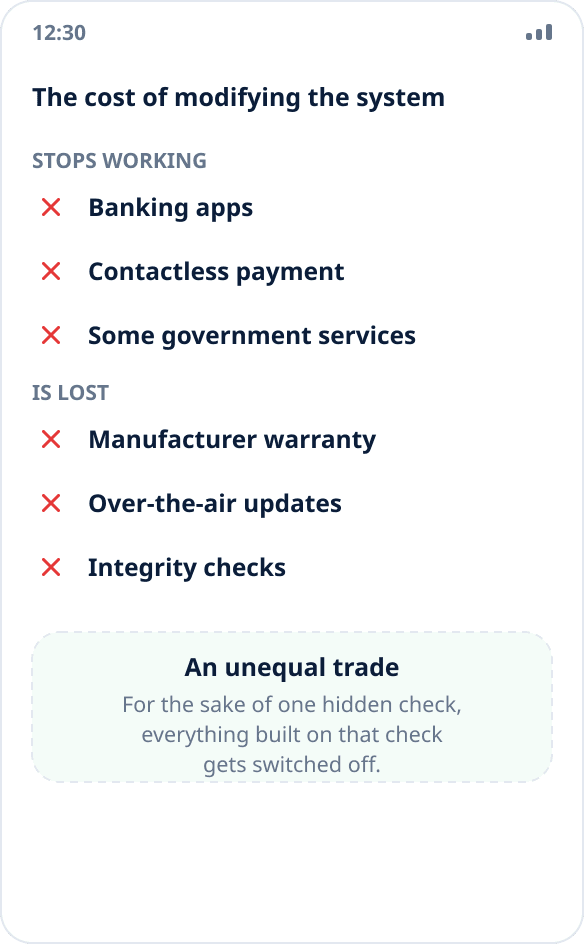
On most devices, unlocking the bootloader wipes all data and voids the warranty — this is the manufacturers' official position, not fine print.
Further down the list: banking apps and contactless payment refuse to work on a device that fails attestation; so do some government and corporate services; over-the-air updates stop installing or break the system when installed; integrity checks stop protecting you — a malicious app with root access gets the same capabilities as a useful one.
A separate item is the risk of leaving the phone unusable. A flashing error on a device with a locked critical partition is fixed by a service center, and not always for free.
Why it is also unstable
Even setting all of the above aside, such a solution has a short life. The mock source flag has changed along with Android versions: before Android 12 apps read one field, from Android 12 another, and the old workarounds stopped working. Platform attestation is updated on the service side, not the device — so it breaks without your involvement and at an arbitrary moment.
In practice this means constant tinkering: after every update of the system, the app or the attestation itself you have to check whether the workaround still works and reconfigure something again. We do not consider this acceptable and do not recommend it to anyone — which is exactly why Mock Location does not hide the flag and will not.
How it ends for the account
Services that check location do not do it out of spite: for them location is proof of a fact. A courier marked a delivery, an employee checked in at a site, a user confirmed a region for a price plan. Faking such proof violates the service's rules, and often a contract too.
The consequences are predictable: an account ban without a refund and without review, for work scenarios — a conversation with the employer, and in some cases legal claims. Our position on the legality of spoofing as such is in a separate answer: you are entitled to change your own location, but misleading a service that relies on that location is a different story.
What to do if you need spoofing for a legitimate task
The good news: the vast majority of scenarios work without any hiding, because the apps there simply do not read the flag.
Maps and navigation, weather, nearby search, local listings and prices, testing location-based scenarios — all of these accept spoofed coordinates as they are. You can check in a minute whether the app you need is in this group: turn on spoofing and see what it shows (how to check).
If the app turns out to be one that reads the flag, the only working option is not to bypass the check but to solve the task differently. Regional content more often needs the network, not GPS: location spoofing or VPN. To test your own app — an emulator and debug builds, where spoofing is built in and fools no one (a walkthrough for QA).
In short
Detection of spoofing cannot be ruled out completely: there are four levels of checks, and modifying the system closes one of them while raising the “device modified” flag, which makes the same apps refuse even earlier.
Mock Location works strictly within Android's built-in mechanism: what this mechanism is, why root is not needed and why an app sees real coordinates are covered separately. We do not publish guides on bypassing checks — not out of caution, but because they do not solve the task and create problems for the user bigger than the original one.