 Mock Location
Location spoofing or VPN — which to choose
“Use a VPN” is the most common advice to someone who wants a service to see a different location. Half the time it does not work, because a VPN and location spoofing change different things: the first changes your network address, the second the coordinates the phone gives to apps. Below is what exactly an app sees in each case, why one does not replace the other and how to tell which one you need.
The short answer
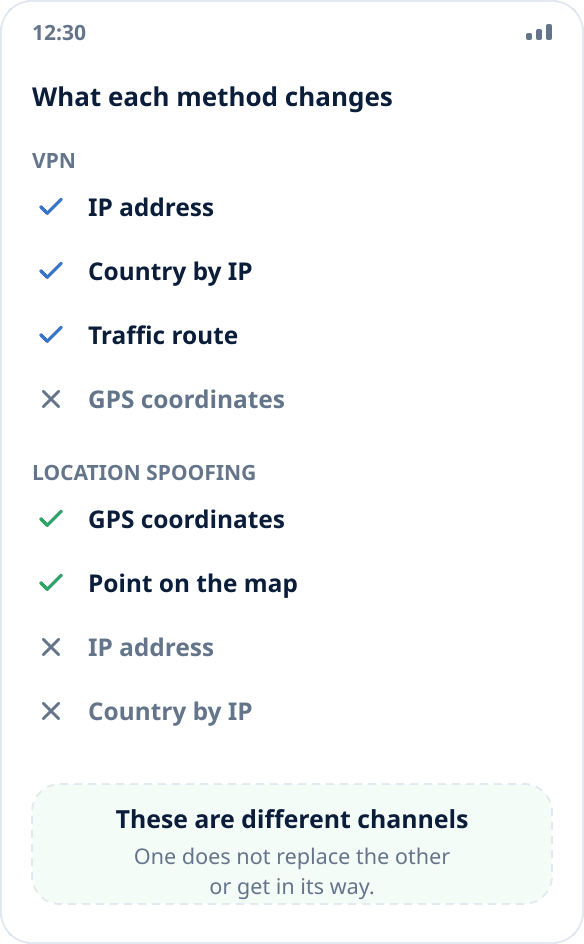
A VPN changes your IP address: traffic goes through a server in another country, and everything determined by the network starts seeing its address instead of yours. Your coordinates stay real — the map on your phone keeps showing you where you are.
Location spoofing changes the coordinates: the app registers in Android as a test location source, and the system gives the chosen point to everyone who asks “where is the user”. The IP address does not change at all.
So the question “which is better” makes no sense — the right question is: by what sign does a particular service determine where you are.
Where an app learns your location from
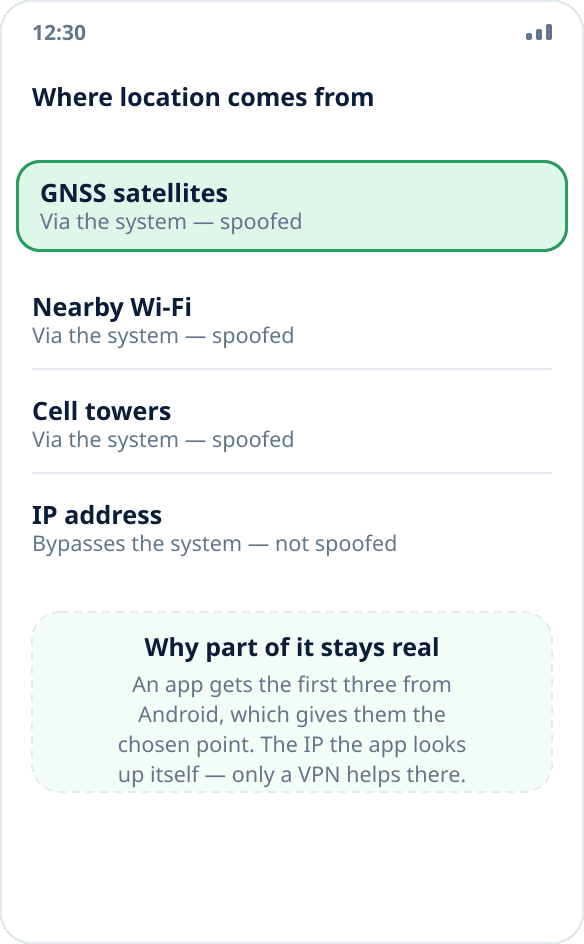
There are four channels, and they behave differently.
GNSS satellites, nearby Wi-Fi points and cell towers are processed by the phone itself, and the result is given to apps through the system location interface. Spoofing replaces everything that comes this way: the app gets the point you chose and cannot tell its source other than by a flag (more on it below).
The IP address the app looks up itself — from the network connection, bypassing the location system. No coordinate spoofing app affects it, and only a VPN helps here.
When you need a VPN
When a service determines your region by the network: a website that serves different content by country; a service that treats you as a foreign visitor; an app with no location access at all — if the permission is not granted, all it has left is the IP.
The sign is simple: if a service works in the browser and has not asked for location permission, it almost certainly looks at the IP.
When you need location spoofing
When an app asks for location access and draws you as a point on the map. Maps and navigation, weather, nearby search, delivery, testing apps at different addresses — all of these work with coordinates, and a VPN has no effect on them.
The check takes seconds: open the app and see whether it shows you on the map. If it does, it works with coordinates.
When you need both
When a service compares one with the other. Some apps match the coordinates against the region by IP and treat a mismatch as suspicious: a point in Moscow with a provider address in another country looks odd, and vice versa. In that case only a consistent picture helps — a VPN with a server in the right country plus coordinates in the same region.
This is not a guarantee: a service is free to look at other signs too, including the mock source flag.
What neither will do
Android marks coordinates from a test provider with a “from a mock source” flag, and any app may read it. Banking, delivery and corporate tracking systems do exactly that — for them spoofing is visible no matter how many VPNs you put on top. Mock Location does not hide this flag: here is why.
A VPN, in turn, does not hide the phone model, the system language, the time zone or the accounts you are signed in to — this is usually enough for a service to figure out where you are.
The sober conclusion: both tools solve specific tasks (region by network and coordinates in an app), and neither makes you invisible.
How to check what actually changes
The easiest way is to measure both separately. Any IP check service shows the address and country: turn on the VPN and make sure they changed. A location check page in the browser shows the coordinates: turn on spoofing and compare them with the chosen point.
A detailed coordinate check procedure is in the guide how to make sure spoofing works.