 Mock Location
How to change your location in a messenger
Messengers use location in several places at once, and spoofing does not affect all of them. Before setting anything up, it helps to separate what the messenger asks the system for (and is therefore spoofed) from what it knows about you from your account and the network (and therefore stays the same).
What depends on coordinates and what does not
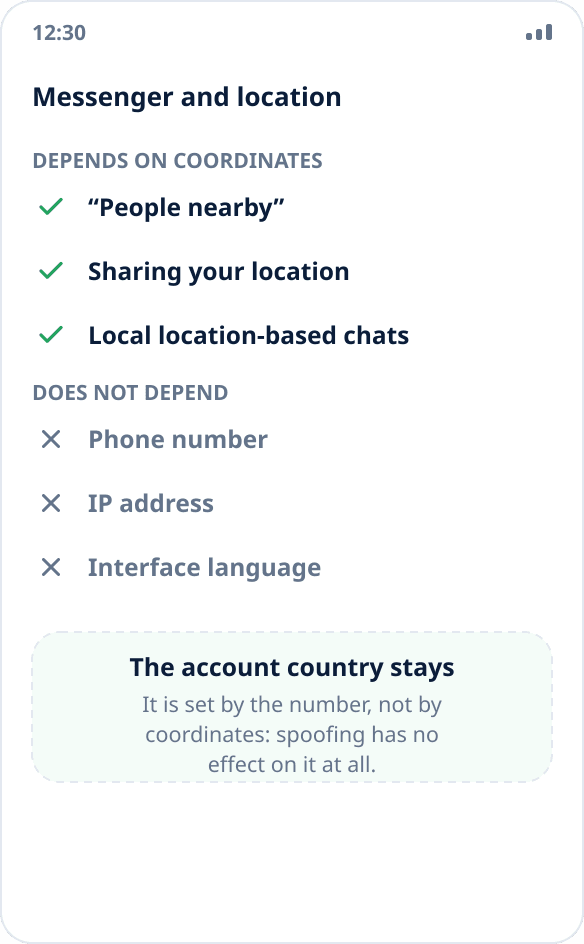
Everything the messenger asks the system for at the moment of the action depends on coordinates: searching for people and groups nearby, local location-based chats, sharing your point in a conversation and the place tag on a message. Spoofing works here: the app gets the chosen point like any other app on the phone.
The account country does not depend on coordinates — it is determined by the phone number the account is registered with. Nor does the IP address by which the service sees where you connect from. Nor do the interface language and time zone. Coordinate spoofing does not affect any of this, and you should not expect a “full country change” from it.
The procedure
First turn on mock location on the phone — step-by-step guide — and set a point in the right place.
Then close the messenger completely and open it again. This matters: apps of this kind request the location when the corresponding screen opens and cache the result, so without a restart you will see the old city.
After that open the screen that works with location (nearby search, sharing a point) — it should show the area you chose.
If nothing changed
Check that spoofing is running at all and that other apps see it: open a map or a location check page (how to check). If another map shows the chosen point but the messenger does not, spoofing is not the problem.
The second reason — the messenger's location permission is “Only while using the app”, and the screen you opened accesses location in the background.
The third — the particular feature does not use coordinates at all. Contact suggestions, the feed and regional content restrictions are more often based on the phone number, account and IP than on GPS.
About risks and limits
Changing coordinates in a messenger is not a way to be anonymous. Your number, account, device and IP stay the same, and the service knows more about you from them than from coordinates.
We do not describe scenarios where spoofing is needed to mislead a specific person or bypass a service restriction: such features usually check the mock source flag, and the consequence is an account ban. What exactly an app sees with spoofing — explained separately.